
When does Portnox Cloud consume a license?
In this topic, you will find information about when Portnox Cloud consumes a license for devices.
In this topic, you will find answers to some common questions about Portnox Cloud licensing.
Network Access Control licensing
- When is a device license consumed?
-
A device license is consumed whenever a new device successfully authenticates to the network.
It is also consumed when a device fails to authenticate and the admin has set an access policy to put the device in a quarantine/remediation VLAN or apply an ACL to it.
- Does a device that is denied access consume a license?
-
Yes: If Portnox Cloud places the new device in a restricted VLAN or applies an Access Control List, this device consumes a license.
No: If a device is denied access to the network completely, it does not consume a license.
- Does a device with multiple network interfaces consume more than one license?
-
Yes: If the device is not managed by AgentP or Intune, Portnox Cloud has no way to recognize that different network interfaces belong to a single physical device, so each interface consumes one license. This could be an Ethernet interface, Wi-Fi interface, docking station Ethernet interface, etc.
No: If the device is managed by AgentP or Intune (requires the device ID SAN value), Portnox Cloud recognizes that the network interfaces belong to the same device and no extra licenses are consumed.
Note:The Intune device ID is the only authoritative identifier used by Portnox Cloud to associate network interfaces and device records. Device names, hostnames, and serial numbers may match even when entries represent different Intune device records. Always compare Intune device IDs when determining whether two entries represent the same device. To check if the network interfaces are correctly associated with the same Intune-managed device, see this troubleshooting topic: How to check if two network interfaces belong to the same Intune-managed device?.
- What else can cause a device to consume more than one license erroneously?
-
A single device can consume multiple licenses if it receives more than one certificate due to configuration changes. Common examples include:
-
You initially configure Microsoft Intune to distribute SCEP certificates to users, but later switch to device-based certificates. The device retains both valid certificates, and there are two separate device entries in Portnox Cloud, consuming two licenses.
-
You configure Intune to distribute SCEP certificates to devices, but accidentally omit the device ID from the Subject Alternative Name (SAN) data. When you fix the configuration, Intune issues a second certificate that includes the device ID, while the original certificate remains valid. This also causes two separate device entries in Portnox Cloud, consuming two licenses.
-
A device is re-enrolled in Microsoft Intune, which creates a new Intune device record with a different Intune device ID. Portnox Cloud treats the new Intune device ID as a separate device, even if the hostname and serial number are the same. This can result in duplicate device entries until the older record stops authenticating and is archived according to the applicable retention rules.
When you update your UEM or MDM software configuration and trigger new certificate distribution, check your device list in Portnox Cloud. Manually delete any duplicate or obsolete entries. If you do not remove them, the old entries remain active and continue to consume licenses until they are removed on the basis of retention rules.
-
- Where to find accurate information about license consumption?
-
-
The tile on the Dashboard that says Total devices in organization.
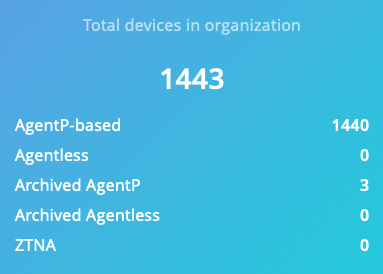
-
In the subscription plan:
-
In the devices.csv spreadsheet: .

-
- When are device licenses reclaimed?
-
Automatic license reclamation works differently depending on the device type:
Licenses for MAB devices are reclaimed 90 days after their last network authentication.
Licenses for devices with AgentP are reclaimed 90 days after their last communication with Portnox Cloud services.
Licenses for agentless devices authenticated via 802.1X are reclaimed 30 days after their last network authentication.
- Can I forcibly reclaim device licenses before automatically reclaiming them?
-
Yes, device licenses can be reclaimed manually by deleting the devices from the devices grid in the UI, using the API, or by unregistering AgentP on the device.
- When are NAC captive portal licenses reclaimed?
-
Captive portal licenses are automatically reclaimed every day at midnight.
Captive portal licenses can be manually reclaimed by deleting the guest account in Portnox Cloud (Guests screen).
- What triggers the License Usage – Device Limit Reached alert?
-
This alert is triggered when the number of devices managed in your Portnox Cloud instance reaches or exceeds the licensed device entitlement. The alert starts when usage reaches 90% of the licensed limit, allowing you to proactively manage capacity before the limit is fully reached. Alerts are generated daily as long as your device usage remains at or above the 90% threshold of your licensed entitlement.
- What is the Extra Allowance Percentage used for?
-
NAC and RADIUS are the only products that include extra allowance. This allowance lets customers use more devices than their purchased entitlements. By default, Portnox gives a 100% extra allowance for both NAC and RADIUS. For example, a customer with a 100-device annual subscription can authenticate up to 200 unique devices each month without being blocked for exceeding their limit.
This extra allowance is designed to give customers the flexibility they need to manage their devices effectively. It allows them to replace old equipment or issue new certificates without service interruptions from reaching their device limits. Customers who exceed their subscription limits but are still within this extra allowance can expect to receive a message from Portnox. They will have the option to buy more device entitlements or remove any unnecessary devices from their Portnox Cloud tenant.
Note:While the extended allowance is automatically applied in the subscription to prevent disruptions, it is not a free or permanent entitlement. Continued device usage beyond your licensed limit may result in additional charges or require a license adjustment.
TACACS+ licensing
- When is a TACACS+ license consumed?
-
A TACACS+ license is consumed whenever a new TACACS+ user successfully authenticates to a TACACS+ NAS device.
- How can I determine which accounts are using a TACACS+ license?
-
On the Devices screen, in the left-hand side menu, select ACCOUNT TYPE, and then select Network administrators.
- When are TACACS+ licenses reclaimed?
-
TACACS+ licenses are reclaimed 30 days after the user’s last successful TACACS+ authentication.
- Where can I see the last time a user successfully authenticated to a TACACS+ device?
-
Click on the Network administrator account name on the Devices screen. The right-hand side pane shows the date and time of the user’s last successful TACACS+ authentication and the NAS device they connected to.
- Can I forcibly reclaim a TACACS+ license?
-
Yes. A TACACS+ license can be manually reclaimed by deleting the account that has an assigned TACACS+ license. You can do this on the Devices screen by activating the checkbox next to the account name and then clicking on the Delete button above.
Zero Trust Network Access (ZTNA) licensing
- When is a ZTNA license consumed?
-
A ZTNA license is consumed when a new user successfully authenticates to a ZTNA-protected resource.
- When are ZTNA licenses reclaimed?
-
ZTNA licenses are reclaimed 30 days after a user’s last successful authentication to a ZTNA-protected resource.
- How can I determine which accounts use ZTNA licenses?
-
You cannot currently see which devices use a ZTNA license in the product. You can see the total number of ZTNA licenses used on the summary dashboard. You can see the total number of licensed ZTNA devices under , shown as Maximum number of Zero Trust Network Access devices.
- How can I forcibly reclaim a ZTNA license?
-
You can manually reclaim a ZTNA license by deleting any device that authenticated to a ZTNA-protected resource in the last 30 days. You can do this on the Devices screen.
Note that deleting the device causes AgentP to remove the certificate from the device and unenroll. The user must manually re-enroll AgentP before they can authenticate to the network (NAC), use MFA (TACACS+), or access a ZTNA-protected resource again.