
How to avoid impossible travel alerts in Entra ID when using Portnox services
In this topic, you will learn what impossible travel alerts are in Entra ID, why they appear when using Portnox services, and how to prevent them for Portnox services in the future.
Microsoft Entra ID includes a risk-based user sign-in protection mechanism that learns user behavior and detects potentially risky sign-ins. One of the alerts this mechanism generates is an impossible travel alert. This alert appears when two successful logins occur from geographically distant locations within an unrealistic time frame.
Such alerts may appear when using some Portnox services – in particular, when using multi-factor authentication provided by Portnox Cloud for TACACS+ services. This MFA mechanism causes the user authentication attempt to connect from the original user location, and then an MFA alert triggered in AgentP reaches Entra ID from a potentially distant geographical location, depending on the original user’s location. As a result, Entra ID treats this as impossible travel and generates an alert.
You can prevent this by adding Portnox IP addresses to named locations and marking them as trusted locations in the Entra ID Protection mechanism. Follow the steps below to do this:
-
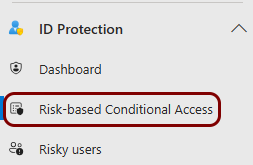
In the left-hand menu, scroll down to the ID Protection section and click on the
Risk-based Conditional Access menu option.
-
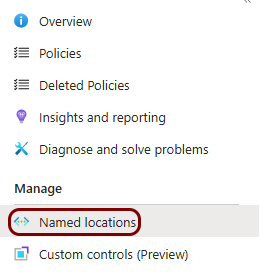
In the Conditional Access | Policies pane, click on the Named locations
option in the left-hand menu.
-
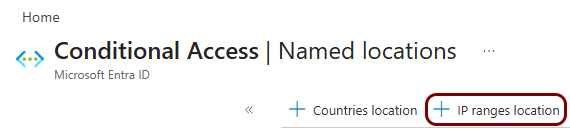
In the Conditional Access | Named locations pane, click on the + IP ranges
location link in the top bar.
-
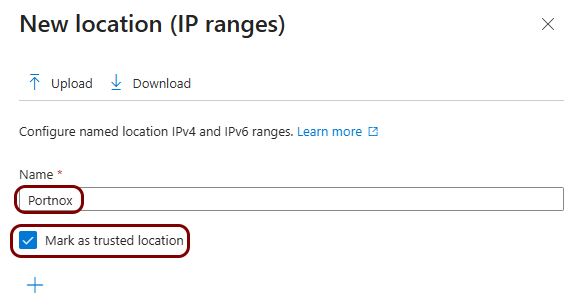
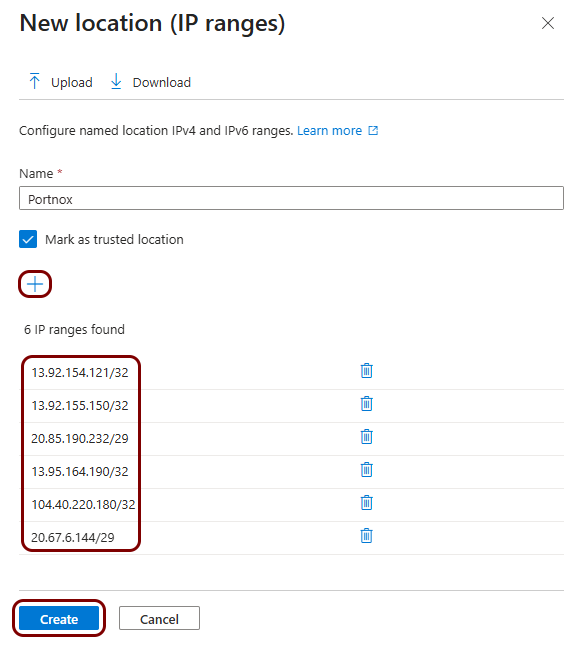
In the New location (IP ranges) pane, enter a name for this location – for example,
Portnox – and activate the Mark as trusted location checkbox.
-
In the New location (IP ranges) pane, click on the + button to add the
following IP ranges. Then click on the Create button at the bottom of the New location
(IP ranges) pane to create the trusted named location.
-
If your instance uses the United States region for the Cloud RADIUS server, enter the following IP ranges:
- 13.92.154.121/32 (used for network authentication)
- 13.92.155.150/32 (used for AgentP enrollment)
- 20.85.190.232/29 (a new IP range that will become the source of all Portnox Cloud traffic in the future)
-
If your instance uses the European region for the Cloud RADIUS server, enter the following IP ranges:
- 13.95.164.190/32 (used for network authentication)
- 104.40.220.180/32 (used for AgentP enrollment)
- 20.67.6.144/29 (a new IP range that will become the source of all Portnox Cloud traffic in the future)
If your instance uses both regions, add all the IP ranges listed above.
-