
Troubleshooting miscellaneous issues related to Portnox Cloud risk assessment
In this topic, you will find troubleshooting information for common issues related to Portnox Cloud risk assessment.
- How does Portnox Cloud check and report risk assessment policy attributes?
-
AgentP monitors the attributes defined in the risk assessment policy. Most attributes do not follow a fixed schedule. Some changes are detected within a minute of occurrence, such as process, service, or antivirus changes. Some attributes, like registry keys, are checked approximately once every hour.
There is no specific order for attribute checks. The overall risk score is calculated from all attributes as soon as the data is available. Devices are blocked immediately when the risk exceeds the defined threshold.
- If you have software that monitors local account login attempts, and use Portnox Cloud with AgentP and risk assessment policies, you may notice that machines with AgentP get locked out because of an excessive number of local account login attempts or because of password quality problems. This behavior was observed, for example, with Defense Storm software. What is causing these lockouts?
-
There is a risk attribute in Portnox Cloud that involves testing local account password quality. To access it, go to: .
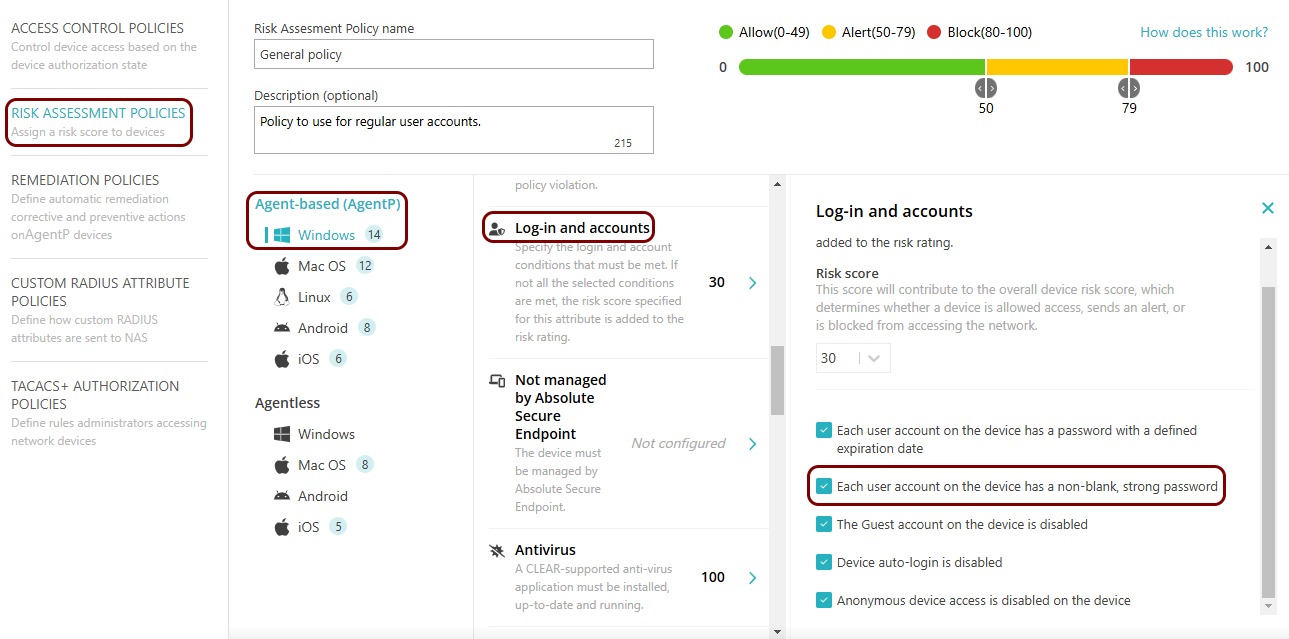
If this risk attribute has a non-zero risk score, AgentP will make many attempts to log in to the local user account using well-known weak passwords. To avoid this problem, set the Risk score of this policy to zero (checks are performed as long as the weight of the policy is non-zero, even if the Each user account on the device has a non-blank, strong password checkbox is inactive) or adjust your alarm limits in your third-party security software. There is no workaround, because to test for weak passwords, AgentP must make many such attempts.
- Why do some devices fail to correlate correctly with SentinelOne?
-
Portnox Cloud correlates a device with its SentinelOne record using the device’s hardware serial number. If a serial number is missing, not found in SentinelOne, or shared by more than one device, this correlation fails and SentinelOne-based risk attributes cannot be evaluated reliably for that device.
The most common cause of duplicate serial numbers is imaging: when multiple devices are built or re-imaged from the same template or golden image, they can end up reporting the same SMBIOS/BIOS serial number, including placeholder values such as To Be Filled By O.E.M. or System Serial Number that were never set to a unique value. SentinelOne reports this firmware value as-is and cannot correct it through its Console, Agent, or API, so the fix has to happen at the hardware/firmware or imaging-template level, by ensuring each device gets a unique serial number during provisioning.
- Which EDR vendors are supported by the Intune Mobile Threat Defense (MTD) integration?
-
Mobile Threat Defense (MTD) is a Microsoft Intune feature that pulls threat data from a mobile device’s endpoint detection and response (EDR) app. Intune uses this data for device compliance and Conditional Access decisions. Portnox reads the same MTD status and uses it in risk policies, so a threat detected on a device can trigger a Portnox risk score change and a network access decision, such as quarantine or block.
The following EDR vendors are supported:
- Microsoft Defender for Endpoint
- CrowdStrike Falcon
- SentinelOne
- Sophos Mobile
- Symantec Endpoint Protection Mobile
- Trellix Mobile Security
- Trend Micro Mobile Security as a Service
- Check Point Harmony Mobile
- BlackBerry Protect Mobile
- Lookout for Work
- Zimperium
- Jamf Mobile Threat Defense
- Pradeo
- Better Mobile / ActiveShield
- iVerify Enterprise
- Trustd Mobile
Each vendor’s EDR app must connect to Intune through its own MTD connector before Portnox can read its threat status.