
How do RADIUS servers work in Portnox Cloud?
In this topic, you will learn the difference between cloud RADIUS and local RADIUS servers in Portnox™ Cloud.
To secure network connections, your network devices need to communicate with AAA servers. The most common protocol used by these servers is RADIUS. Portnox Cloud lets you run Cloud RADIUS servers dedicated to your organization as well as local RADIUS servers that act like proxies.
How do Cloud RADIUS servers work?
-
Portnox Cloud has two RADIUS server farms in the Azure cloud. One in the United States and one in Netherlands.
-
When you create your Portnox Cloud account, you select if you want to use just one of those locations (for legal reasons) or both of them. This setting cannot be changed later.
-
If you choose both locations, you can configure your NAS devices to use just one of the two servers (for example, depending on the geographical location) or both of them (for example, prioritizing the one that is closer).
-
There is no difference between the two server farms except for their location. Both farms have real-time access to all your Portnox Cloud data and both offer the same quality of service and bandwidth.
-
When you create a Cloud RADIUS server instance, you receive a unique combination of an IP address and two port numbers. This combination is not used by any other Portnox Cloud customers – it’s an instance that is dedicated to you.
-
If you configure your NAS devices to use Cloud RADIUS servers, user/IoT devices attempting to connect to the network managed by these NAS devices will cause the NAS device to contact the Cloud RADIUS server to authenticate the user/IoT device.
-
Cloud RADIUS servers work for you 24/7, unless you have Internet connectivity problems. To have access to cloud RADIUS functions even when your NAS devices have no connection to the Internet, see below: How do local RADIUS servers work?
-
Cloud RADIUS servers work in N+2 redundancy mode. That means that there are at least 3 instances (main and two backups) running 24/7, in each of the geographical locations, to cover for any potential problems with one of the instances.
How do local RADIUS servers work?
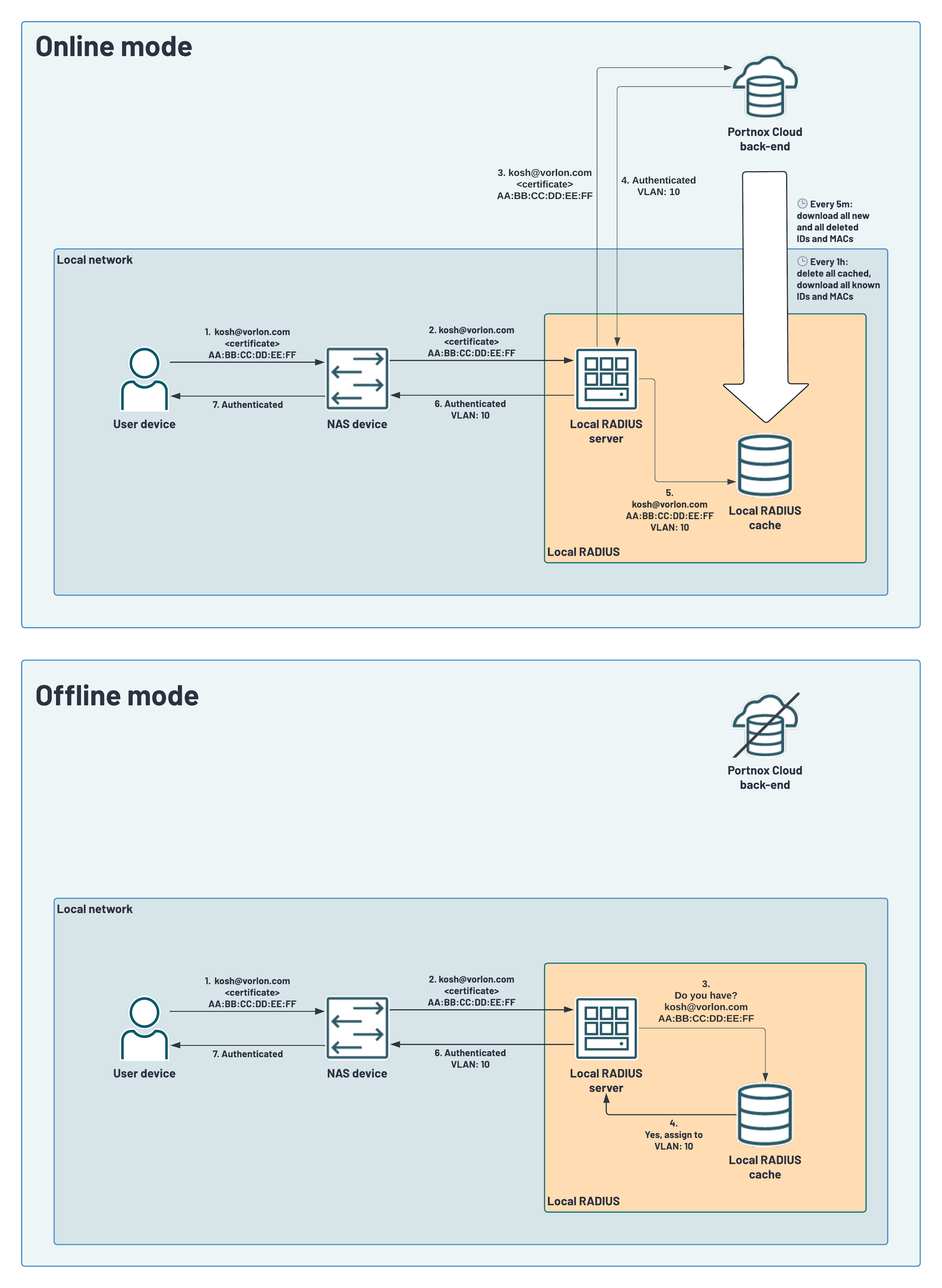
-
The local RADIUS server is an optional component that you can install manually in your local network.
-
The local RADIUS can be deployed as a secure virtual machine running on Tiny Core Linux or a Docker container. When you start it, it downloads the configuration from the cloud and starts responding to RADIUS queries on configured local IP address and ports.
-
The local RADIUS server communicates with the activated Cloud back-end that is geographically closest. For example, if you have both Cloud RADIUS servers activated, and your office with the local RADIUS server is in Europe, the local RADIUS server will communicate with the European Cloud back-end.
-
During normal operation, the local RADIUS server receives RADIUS communication and sends the request data to the Cloud back-end via HTTPS (not as a RADIUS forwarder), requesting a decision on authentication. The Cloud back-end performs the full authentication flow the same way as it would if the request came from the Cloud RADIUS, stores the results in the Cloud database, and sends the data needed to answer the RADIUS request back to the local RADIUS server. As long as the Cloud back-end is available, the local RADIUS server does not perform authentication on its own and does not act as a cache (except when you turn on the local cache and/or EAP session resumption: see below).
-
The local RADIUS server keeps a local outage cache of successful authentications for the last 7 days. The cache does not store any authentication data – only MAC addresses and identification information. The local RADIUS server uses this cache only when it cannot reach the Cloud back-end, for example during an Internet outage. In that case, the cache is looked up using the MAC address as the primary key; if no match is found, authentication fails. If a match is found, the username or device identifier is used to select the correct cached response, since multiple users may have authenticated from the same device with different authorization attributes. If the username isn’t present among the cached entries for that MAC address, the first available cached response for that device is used instead.
-
The local RADIUS server keeps the outage cache of successful authentications up to date by syncing with the Cloud back-end in two ways. Every minute, it requests all successful authentications from the last minute and removes cache entries for devices that should no longer be authenticated (for example, deleted or blocked devices). Every hour, it performs a full cache refresh, replacing its entire cache with all successful authentication data from the back-end for the last 7 days. This means all local RADIUS server instances for the same tenant always reflect the same state as the back-end, including authentications originally handled by other local RADIUS servers.
-
When the local RADIUS server cannot connect to the Cloud, it will not delete any cached information, so cached information from the last 7 days of activity prior to the outage may stay in the outage cache indefinitely until the connection is reestablished. Note that during an outage, only devices that are already in the outage cache can connect to the network – any new devices will be unable to authenticate until the connection is restored.
-
The local RADIUS server also has an optionally activated local cache for fast reconnections, with a cache lifetime configured when creating or editing the local RADIUS server in Portnox Cloud. When turned on, the MAC address and identification data are stored for the configured lifetime. If a known device reconnects within that time, the cache is looked up the same way as during an outage: MAC address as the primary key, then username or device identifier to select the correct cached response among multiple users of the same device. If the username isn’t found among that MAC address’s entries, the first available cached response is used instead. This cache is turned off by default, with a default lifetime of 1 hour if enabled.
-
Both the local RADIUS and Cloud RADIUS also support EAP session resumption (as defined in RFC 5216), which is another caching mechanism that works at the EAP method level for TLS-based EAP methods. After a successful EAP exchange, the server caches the TLS session ID for a configured time. When the client reconnects within that time, it can present the session ID instead of going through the full EAP exchange again. However, the client device must also support EAP session resumption for this to work. This cache is also turned off by default, with a default lifetime of 1 hour if enabled.
-
The local RADIUS server provides equivalent or greater security compared to a RadSec proxy offered by some other cloud RADIUS providers, while also adding outage resilience that a RadSec proxy cannot offer. A RadSec proxy is a local agent that accepts unencrypted RADIUS requests from NAS devices that do not support RadSec natively, then re-encapsulates them as RadSec to forward to a RadSec server, which in turn contacts the provider’s back-end. This means the communication path has three hops: an unencrypted local RADIUS segment, a TLS-secured Internet segment, and a final internal segment within the provider’s infrastructure. With local RADIUS, the same unencrypted RADIUS segment exists locally on your network, but the local RADIUS server then contacts the Cloud back-end directly over HTTPS (TLS), skipping the intermediate RadSec server entirely. The result is a two-hop path that is equally secure, as HTTPS and RadSec both use TLS for transport encryption, but more direct and therefore faster. In addition, because the local RADIUS server maintains an outage cache of recent authentications, it can continue to authenticate known devices during an Internet outage, which a RadSec proxy cannot do.
Additional recommendations
-
The priority order in which you configure Cloud RADIUS and local RADIUS servers on your NAS devices affects how authentication behaves both during normal operation and during an Internet outage. Several configurations are possible, each with different trade-offs for outage resilience, reconnection speed, and redundancy. For guidance on choosing the configuration that best fits your environment, see Portnox Cloud best practices.
-
Since the local RADIUS connects to the Cloud back-end using HTTPS rather than RADIUS packets, make sure it has sufficient QoS priority so that it can perform authentications even when the Internet connection at the site is heavily used. HTTPS is often assigned a lower QoS priority than protocols that require faster response times, which may cause timeouts when performing RADIUS authentications.
-
When you deploy your local RADIUS server, make sure to configure it with persistent memory. This is the default for virtual machine deployments, but additional parameters may be needed for Docker deployments depending on the platform. Without persistent memory, if the local RADIUS server restarts during an Internet outage, the outage cache will be lost and devices will not be able to authenticate until the Internet connection is restored.
-
Please note that authenticating devices from the local cache on the basis of the MAC address and username is less secure than a full authentication with the Cloud back-end, as MAC addresses can be spoofed. If your devices support EAP session resumption, we recommend using that instead of the local cache, as it provides faster reconnection while remaining significantly more secure – the TLS session key used in EAP session resumption is much harder to compromise than a MAC address. The local cache is best suited for situations where device support for EAP session resumption is limited, or where authentication speed is a priority. Also note that if both local cache and EAP session resumption are turned on, EAP session resumption has higher priority.